

Eziplan has a variety of Appointment Types, one of which is the Support Coordination Entry. This Appointment type is built specifically for NDIS Support Coordination, however is utilised elsewhere where a note being added to the CRM also involves a billable component.
Accessing Support Coordination Entry
You will first need to request access to this feature by reaching out to our friendly customer support team. Once enabled you will be able create a Support Coordination Entry by using the quick access menu:
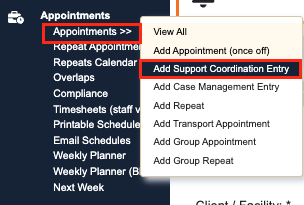
Adding in a Support Coordination Entry
Once you are in the Support Coordination Entry space, you will notice it looks similar to the Add Appointment Feature.
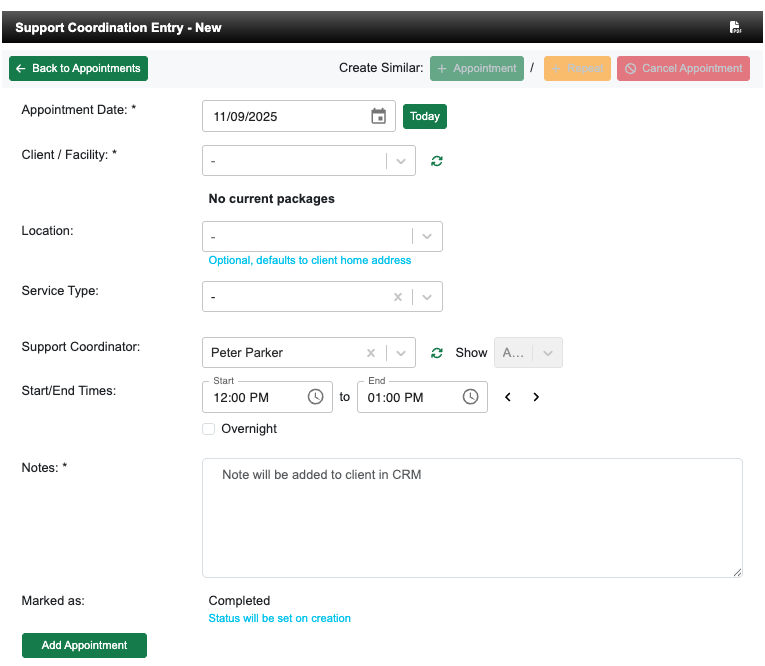
Ensure that all mandatory fields are filled in.
The only difference with the Support Coordination Entry is that the status will be set immediately to complete, and a note will be added directly into the Clients CRM.