

Overview
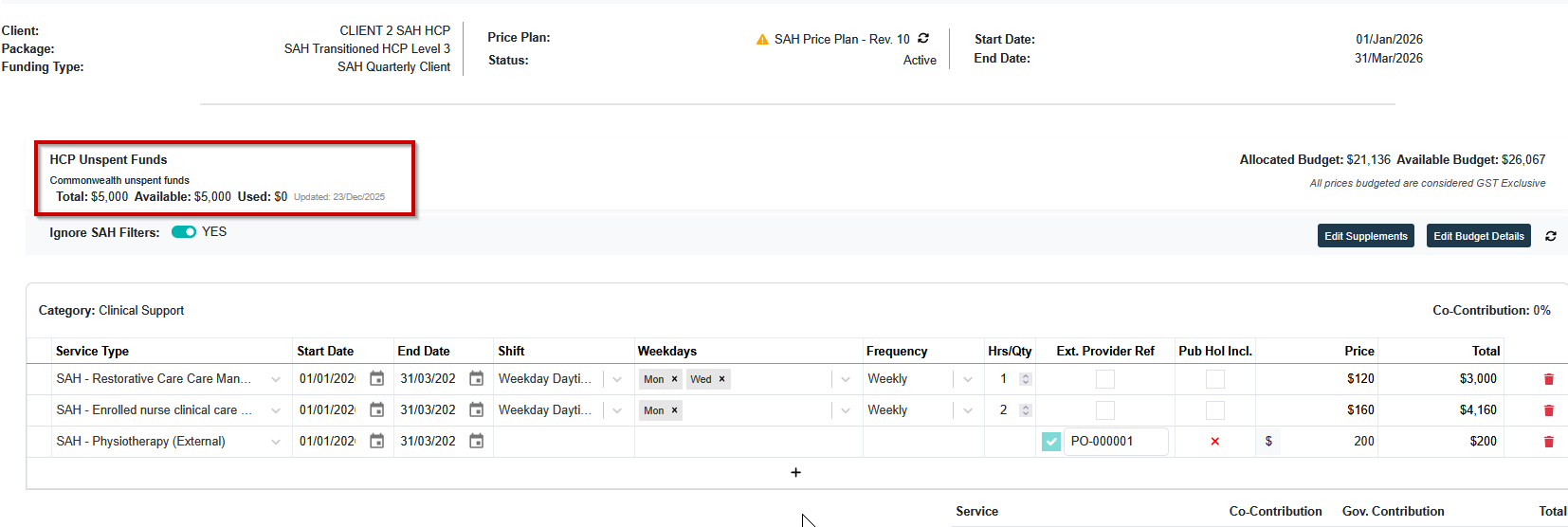
Eziplan now displays live Home Care Package (HCP) budget values directly in the Budgets screen. This replaces the previous placeholder with real-time data from your ACO budget uploads, so coordinators can view current unspent HCP balances without leaving Eziplan.
Who Does This Apply To?
This feature is available to all Support at Home providers with Home Care Package (HCP) clients. Budget values are sourced from your ACO-uploaded SAH budgets and update automatically when a new budget file is uploaded.
Balances with the following tags will show:
Home Care Account (HC)
Commonwealth Unspent Funds (CU)
What You Will See
When you open a budget record for a client with an HCP package, the screen will display:
Current unspent HCP budget balance (live from ACO upload)
A last updated date showing when the budget data was last refreshed
How to View HCP Budget Values
Steps to view HCP budget data
Navigate to Budgets from the main menu
Search for the relevant client
Open the client's budget record
HCP budget values will appear automatically if the client has an active HCP package
Frequently Asked Questions
Why isn't the HCP budget showing for my client?
HCP budget values are sourced from your ACO budget uploads. If no budget has been uploaded, or the client does not have an active HCP package, the field will not display a value.
You can review this within Config > Budgets to confirm as well as your most recently uploaded ACO Budgets
How often is the budget value updated?
Budget values update each time a new ACO budget file is uploaded. The 'Last Updated' date shown on screen reflects the date of the most recent upload.