

Sometimes, you will come across Case management notes that look to be duplicated. Or sometimes a case management note that YOU didn't leave. This can look like a duplicate or system glitch - but it isn’t.
Why this happens
Each time an existing case management appointment is updated,
the system will display the below alert giving you option:
This feature allows the user to decide whether the note to be left again as a separate entry:
Keep a complete record of every interaction related to that appointment
Maintain a clear audit trail for compliance
Show exactly what changed and when
Avoid the need to create multiple appointments for separate interactions
These automatically generated note entries include a case management entry number, which helps you identify where the information came from.
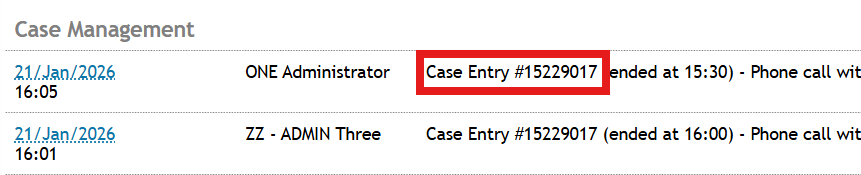
Example: How this helps your workflow
If you have multiple interactions with a client during the day, the system records each one. For example:
You email a client (5 minutes) - Case management appointment generated #1234
You move on to another client (15 minutes) - Case management appointment generated #5678
The original client calls you back (10 minutes) and you provide assistance - You go back to #1234 to add further details
Instead of needing separate appointments, all these interactions can be captured within a single appointment(#1234). The system then displays each change so nothing is missed.
Who should edit an appointment?
Generally, once a case management appointment and its note have been entered by one care partner, we recommend that no one else modify it unless:
They have also interacted with the client, or
They need to update details relevant to their role
This helps maintain accuracy and avoids unnecessary edits.