

There are times when a care partner may need to update a care management entry they've already submitted. Common scenarios include:
Additional activity on the same day – For example, a client calls back or sends a follow-up email after the initial entry was created. Instead of creating a new entry, the care partner can locate the existing appointment and update it accordingly.
Incorrect details – For example, the wrong package schedule or time was recorded and needs to be corrected.
How the System Handles Updates
When saving changes to an existing care management entry, the system will display an alert asking whether you'd like to leave a note (image below)
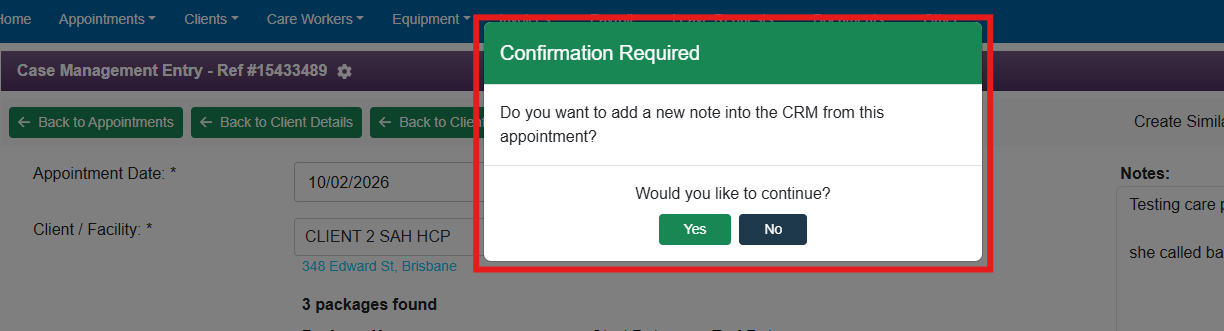
Select YES if you want to leave additional notes. The note will be saved as a separate entry under the name of the person making the change.
If selected YES, this is for the purpose of keeping a complete record of every interaction related to that appointment
Maintain a clear audit trail for compliance
Show exactly what changed and when
Avoid the need to create multiple appointments for separate interactions
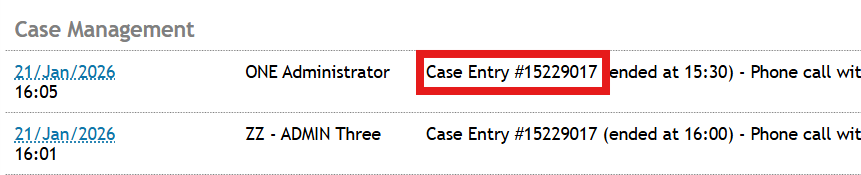
These automatically generated note entries include a case management entry number, which helps you identify where the information came from.
Select NO if you are only correcting details on the existing entry and do not need to leave a note.