

Overview
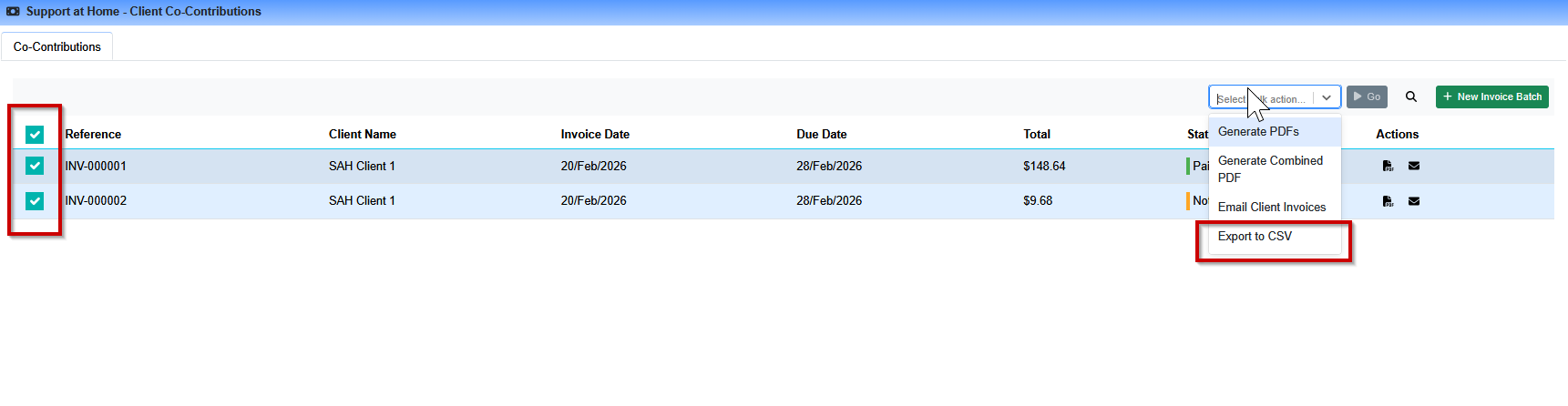
Co-contribution invoices can now be exported in bulk to a CSV file directly from the invoice table view. This makes it easy to reconcile invoices, share data with your accounts team, or produce reports outside of Eziplan.
What Is Included in the Export?
The CSV export includes the following fields for each invoice and its line items:
Invoice Reference
Client Name
Client Address
Status
Invoice Date
Due Date
Service Date (per line item)
Service Name (per line item)
Line Amount (per line item)
The Client ID and Accounting System Reference fields are sourced directly from the client's profile in Eziplan. These are useful for matching exported invoices against records in your accounting or finance system.
How to Export Co-Contribution Invoices to CSV
Steps to export invoices
Navigate to SAH > Co-Contribution
Use the filter options to narrow down the invoices you need
Select the invoices you want to export using the checkboxes, or select all using the header checkbox
Click Export Selected to CSV
The CSV file will download to your computer
Tips:
Use the date filters to isolate invoices for a specific billing period before exporting
You can select individual invoices or use the 'select all' option for bulk exports
If your accounting system uses a reference code to identify clients, ensure the Accounting System Reference field is populated on each client profile for best results