

Overview
The Service Type Exclusions feature allows your organisation to restrict specific service types from being used across Eziplan's Support at Home (SAH) claims workflow.
Once a service type is excluded, it will be removed from use in all related areas of the system — preventing it from being nominated, associated, or submitted in claims.
When would you use this?
This feature is designed for a common scenario where external services are tracked in the roster(through appointments) but billed through supplier invoices.
Some providers roster externally supplied services against a dummy client or worker to help manage scheduling and visibility. However, the actual charge for these services is uploaded separately via a supplier invoice — not generated from the appointment itself.
When claims are processed, Eziplan may pick up charges from both the appointment and the supplier invoice, resulting in a double-up on the claim. This is not intentional and can lead to overbilling.
By excluding the relevant service type, you ensure that:
Appointments for that service type are not included in claims
The charge is only pulled from the supplier invoice, as intended
Your claims remain accurate and avoid duplication
In short: if your team uses appointments purely for rostering and tracking purposes, but the actual billing happens through supplier invoices — this feature is for you.
How to Exclude a Service Type
Step-by-step: Adding a service type exclusion
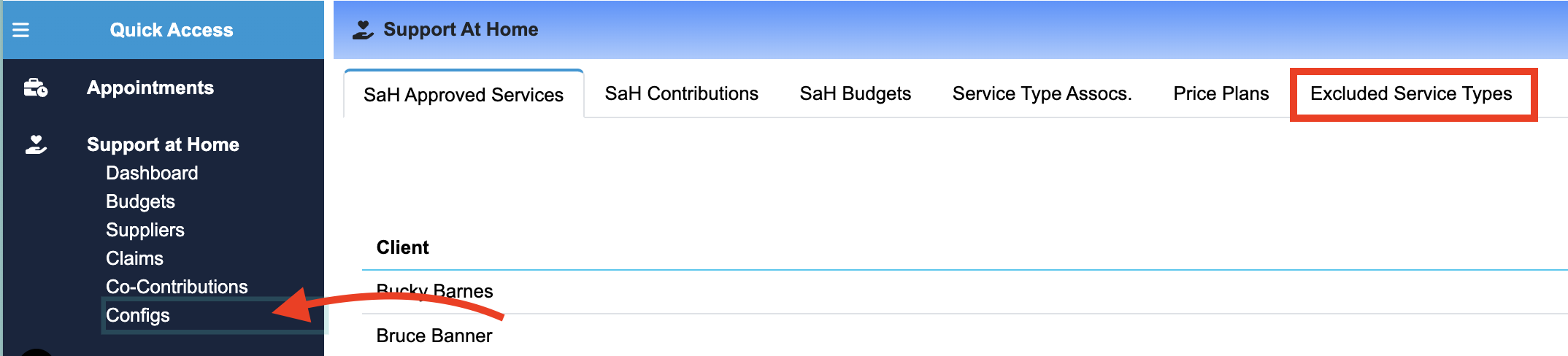
Navigate to Support at Home > Configs > Service Type Exclusions.
Click Add Exclusion.
Select the service type you wish to exclude from the dropdown.
Read and acknowledge the warning that this will remove the service type from all SAH areas.
Click Save to apply the exclusion.
Where Exclusions Apply
Price Plans
Service Type Associations
Client Budgets
Supplier Invoices
Claims