

This article is designed to give you an overview of Eziplan's approach to the new Support at Home Reforms due to go-live on 1 November 2025 (delayed from 1 July 2025).
Support at Home will be receiving a dedicated module with multiple features combining to create one efficient system that helps you stay compliant and reduce busy work. Below is a basic diagram for the flow of information and features that make up Support at Home:
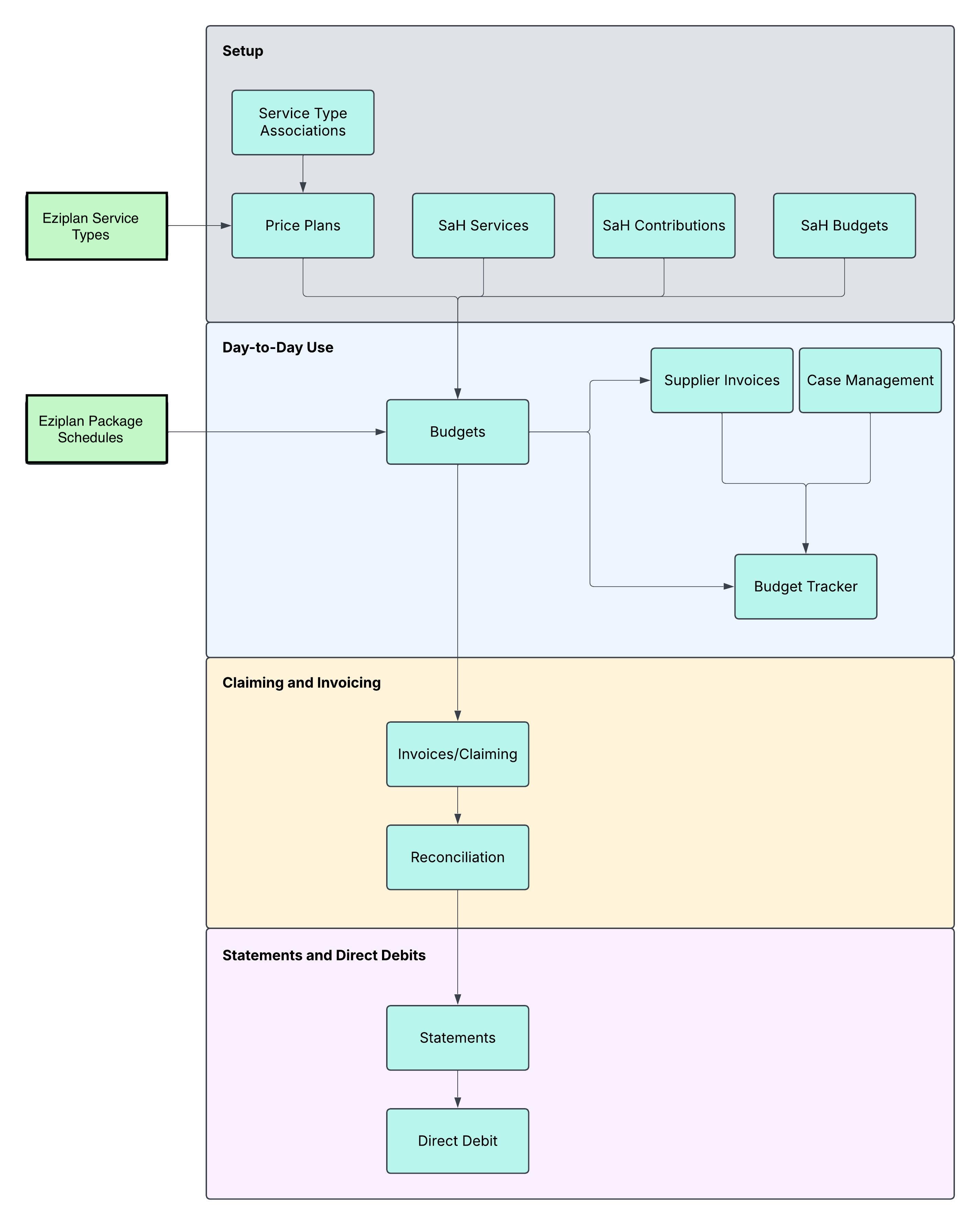
Setup
To make Support at Home work within Eziplan, a number of features need to be used and completed. There are two mandatory features for the rest of the functions to work and some additional setup features that will increase functionality of other features further down the flow.
Service Type Associations (Mandatory)
This feature is built to help you match your existing Eziplan Services to the new SaH service types. You can find more information.
Price Plans (Mandatory)
This feature is built to help you build out your Price Plan for each service type in Eziplan
SaH Service
This is a non-mandatory feature that will allow you to upload Approved Services per client. Until SaH is released on the 1st of November 2025 there will be no data required here
SaH Contributions
This is a non-mandatory feature that will allow you to upload Co-Contribution percentages per client. Until SaH is released on the 1st of November 2025 there will be no data required here
SaH Budgets
This is a non-mandatory feature that will allow you to upload Budget Totals per client. Until SaH is released on the 1st of November 2025 there will be no data required here
Day to Day Use
The Features Contained in this section will be the most heavily used in the day to day environment and have been designed to increase operational efficiency
Budgets
Under the new Support at Home within Eziplan, Budgets have received a large upgrade compared to the existing Home Care Package Budgets allowing for greater in depth planning. You can find more about the Budget Builder here
Budget Tracker
A new feature is the budget tracker that is available on a company wide and individual client perspective. This budget updates in realtime giving Case Managers and Executive Team up to date information to make informed decisions.
Case Management
A new feature is the Case Management Feature allowing Case Managers to record their notes and an associated time component to be billed.
Supplier Invoices
Supplier Invoices allows providers to upload 3rd party invoices and complete an approval process before claiming as part of Support at Home
Claiming and Invoicing
Eziplan has features being built specific to Invoicing and Reconciling invoices with Services Australia. We will populate this section as we get closer to releasing features.
Statements and Direct Debit
Eziplan has features being built specific to building compliant easy to read statements as well as integrations with direct debiting solutions for collecting Co-Contributions. We will populate this section as we get closer to releasing features.