

Overview
Eziplan can now generate SAH client statements for clients who had no appointments or claims in the selected period. This is useful for new clients who have a budget set up but haven't yet received services, or for existing clients who took a break from services in a given month. The statement will show opening and closing balances without any service line items.
How to Include Zero-Activity Clients in a Statement Run
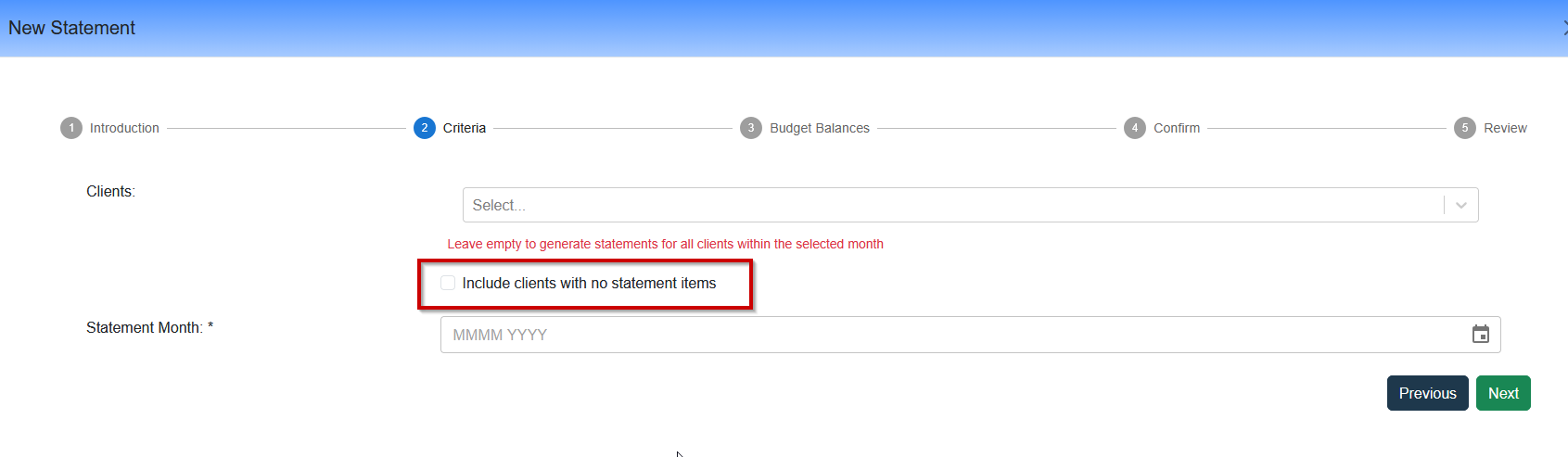
When generating SAH client statements, a new checkbox option is available on Step 2 of the statement wizard:
Navigate to Support at Home → Statements and select New Statement.
On Step 2, leave the Clients field blank (or select specific clients as usual).
Tick the "Include clients with no statement items" checkbox.
Select your statement period and proceed to the Confirm step.
The estimate will include eligible clients who have an active budget for the period but no claims — review and proceed to generate as normal.
Which Clients Are Included?
When this option is enabled, Eziplan includes any client who:
Has an active SAH budget that overlaps the selected statement period, and
Has no claim items in the selected date range, and
Does not already have a statement generated for that period
Clients who already have a statement for the period will not be duplicated, even if this option is enabled.