

Overview
When you upload a PRODA payment summary file into Eziplan, the file may contain different types of payment items alongside standard current-period services. Two of these types — Amendments and Adjustments — relate to changes Services Australia has made to prior payments and are now fully supported in Eziplan's reconciliation and statement workflow.
What Is the Difference Between an Amendment and an Adjustment?
Both amendments and adjustments appear in your PRODA payment summary file as a pair of items: a Previous item (reversing the original payment) and either an Amendment or Adjustment item (recording the new amount).
Amendment: A change initiated because the service details changed — for example, a service was rescheduled, cancelled, or the hours were corrected.
Adjustment: A change initiated by Services Australia — for example, a recalculation of a client's contribution amount due to a means assessment update. The service itself did not change, but what the government pays (and what the client owes) has changed.
How Amendments and Adjustments Appear in the Reconciliation Wizard
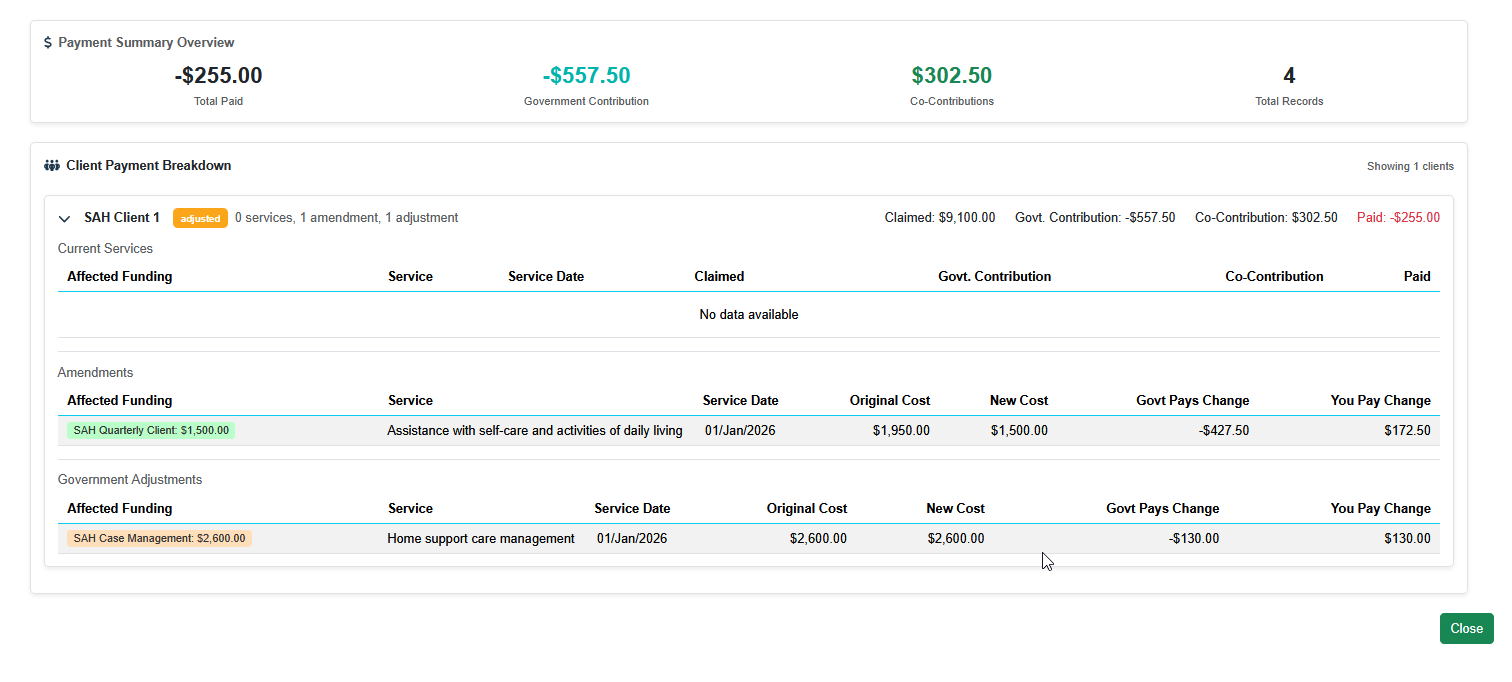
On the Resolve step (Step 3) of the reconciliation wizard, each client card now displays three separate sections:
Current Services — the standard services claimed in the period
Amendments — any service changes from prior periods
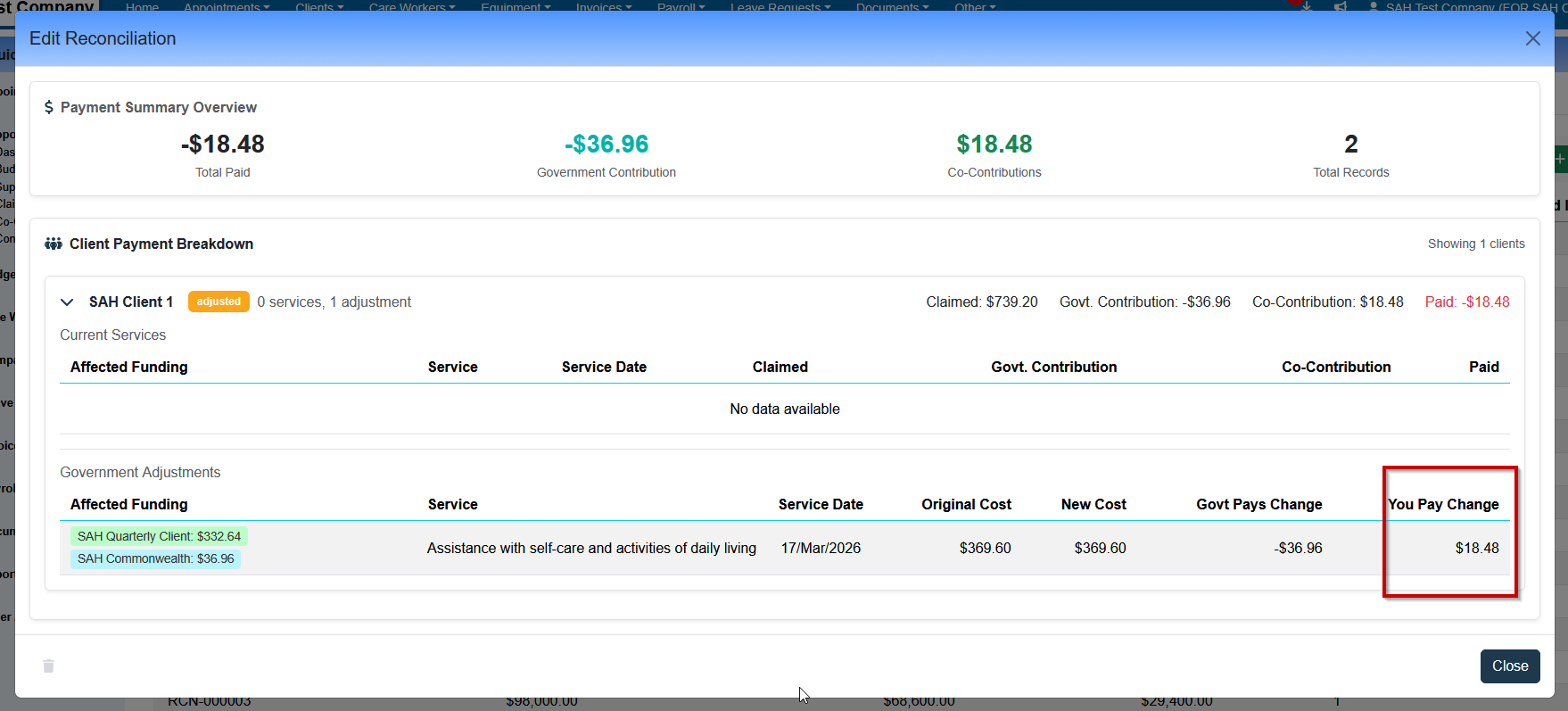
Government Adjustments — any contribution recalculations from Services Australia
Previous items are not shown as standalone rows. They are paired with their corresponding Amendment or Adjustment and displayed as a single change summary, showing exactly what changed.
Reconciliation Summary Totals
The Reconciliation Summary screen displays client-level totals for Claimed, Co-Contribution, and Paid amounts. For amendment and adjustment pairs, these totals now reflect the net change rather than a sum of both sides of the pair — ensuring the summary accurately represents what has actually changed from the client's perspective.
For example, if a previous item and its amendment together represent a $50 reduction in the claimed amount, the Claimed total will show –$50, not the raw sum of both items. This is consistent with how Government Contribution totals have always been displayed.
If you previously noticed totals appearing unexpectedly large in the reconciliation summary for clients with amendments or adjustments, this has now been corrected.
How Amendments and Adjustments Appear on Client Statements
Client statements now include a more detailed breakdown for any amendments or adjustments present in the reconciliation period. For each item, the statement shows:
Amendment and Adjustment columns on statements
Date — the date of the original service
Service — the service type
Original Cost — the cost that was previously claimed
New Cost — the revised cost after the amendment or adjustment
Govt Pays (change) — the net change in the government's payment
You Pay (change) — the net change in the client's contribution
A negative value in the You Pay (change) column means the client owes less than previously — for example, -$22.50 means the client's contribution has been reduced by $22.50.
Uploading a Reconciliation File Containing Adjustments
No additional steps are required. When you upload a PRODA payment summary file that contains Adjustment items, Eziplan will process them automatically alongside any Amendment and Current items. If a file previously failed to upload due to adjustment items, re-uploading it should now succeed.
Frequently Asked Questions
Why do I see negative amounts in the Government Adjustments section?
Negative amounts reflect a reduction. For example, if the government previously paid $450 for a service and the adjustment reduces this to $350, the Govt Pays change will show -$100. This is correct behaviour and mirrors how Services Australia presents the same information in their own payment statements.
Do I need to do anything differently when generating statements after uploading a file with adjustments?
No. Statement generation works the same way. Adjustments will be included in the statement automatically for any client where they apply. The statement will show the adjustment detail in a separate section below the standard services.
The totals in my Reconciliation Summary look different to before — is this correct?
Yes. Claimed, Co-Contribution, and Paid totals for amendment and adjustment pairs now show the net change (delta) rather than the sum of both sides of the pair. This is the correct representation and matches how Government Contribution totals have always worked. If you were previously seeing inflated totals for clients with amendments or adjustments, those figures are now accurate.